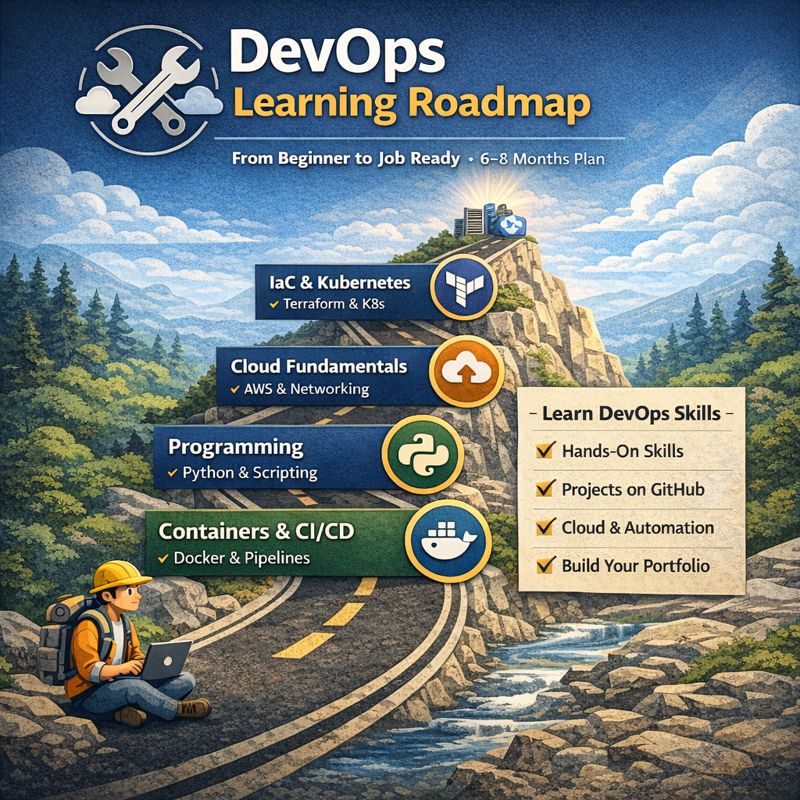
Phase 1 – Core Foundations (Linux, Networking, Git)
Phase 2 – Programming & Scripting
Phase 3 – Cloud Fundamentals (AWS-first)
Phase 4 – Containers & CI/CD
Phase 5 – Infrastructure as Code & Kubernetes
Phase 6 – Monitoring, Security & Real Projects
Phase 7 – Portfolio + Job Readiness
Total: 6–8 months (can be faster if full-time)
🔹 PHASE 1: CORE FOUNDATIONS (Weeks 1–4)
Most DevOps beginners fail here. This phase is non-negotiable.
Week 1 – Linux Basics (Daily Hands-on)
Goals
- Understand Linux filesystem
- Move comfortably in terminal
Tasks
- Install Ubuntu (VM or WSL)
- Learn:
ls,cd,pwd,cp,mv,rmcat,less,head,tailgrep,find
- Practice:
- Create users
- Change permissions (
chmod,chown)
Deliverable
✔ Navigate Linux without Google
✔ Create and manage files & users
Week 2 – Linux + Processes + Networking
Tasks
- Learn:
ps,top,htopsystemctlkill,nohup
- Networking basics:
- IP, DNS, ports
ping,curl,netstat,ss
- Install & run:
- Nginx
- Restart service
Deliverable
✔ Start/stop services
✔ Understand how apps listen on ports
Week 3 – Git & GitHub (CRITICAL)
Tasks
- Learn:
git init,clone,add,commitpush,pull- branches & merge
- Create GitHub account
- Push your first repo
Mini Project
- Linux notes repo
- Commit daily
Deliverable
✔ Confident Git usage
✔ GitHub activity visible
Week 4 – Basic Bash Scripting
Tasks
- Learn:
- variables
- conditionals (
if) - loops
- Write scripts:
- Disk usage alert
- Backup a folder
- Restart a service if down
Deliverable
✔ 3 working bash scripts in GitHub
🔹 PHASE 2: PROGRAMMING (Weeks 5–6)
DevOps ≠ coding like a software engineer, but you must script.
Week 5 – Python for DevOps
Tasks
- Learn:
- variables
- lists, dicts
- functions
- Practice:
- Read/write files
- Parse logs
- Call shell commands
Mini Project
- Python script to monitor disk usage
Week 6 – APIs & Automation
Tasks
- Learn:
- REST APIs
- JSON
- Use Python to:
- Call public APIs
- Automate system tasks
Deliverable
✔ Python automation repo
🔹 PHASE 3: CLOUD FUNDAMENTALS (Weeks 7–10)
AWS is the industry default. Learn one cloud deeply.
Week 7 – AWS Basics
Tasks
- Create AWS Free Tier
- Learn:
- EC2
- IAM
- Security Groups
- Launch EC2
- SSH into it
Week 8 – Storage & Networking
Tasks
- Learn:
- S3
- VPC
- Subnets
- Host a static website on S3
Week 9 – Databases & Scaling
Tasks
- Learn:
- RDS
- Load Balancers
- Auto Scaling
- Connect EC2 → RDS
Week 10 – AWS Project
Project
- Deploy a web app:
- EC2
- Nginx
- S3 for assets
- IAM roles
Deliverable
✔ Cloud architecture diagram
✔ Deployed app URL
🔹 PHASE 4: CONTAINERS & CI/CD (Weeks 11–14)
Week 11 – Docker
Tasks
- Learn:
- Images
- Containers
- Volumes
- Dockerize:
- Simple Python app
Week 12 – Docker Compose
Tasks
- Multi-container app
- App + DB
- Use
.envfiles
Week 13 – CI/CD
Tasks
- Learn:
- GitHub Actions
- Build pipeline:
- Build image
- Run tests
- Push to Docker Hub
Week 14 – CI/CD Project
Project
- On commit:
- Run pipeline
- Deploy container to EC2
Deliverable
✔ Automated deployment
🔹 PHASE 5: INFRASTRUCTURE AS CODE & K8s (Weeks 15–18)
Week 15 – Terraform
Tasks
- Learn:
- Providers
- Resources
- State
- Create:
- EC2
- Security Group
Week 16 – Advanced Terraform
Tasks
- Variables
- Modules
- Remote state (S3)
Week 17 – Kubernetes Basics
Tasks
- Learn:
- Pods
- Deployments
- Services
- Use:
- Minikube or Kind
Week 18 – Kubernetes Project
Project
- Deploy app to K8s
- Add:
- Scaling
- Rolling updates
Deliverable
✔ Kubernetes manifests in GitHub
🔹 PHASE 6: MONITORING, SECURITY & RELIABILITY (Weeks 19–20)
Week 19 – Monitoring
Tasks
- Learn:
- Prometheus
- Grafana
- Monitor:
- CPU
- Memory
Week 20 – Security & Best Practices
Tasks
- Secrets management
- IAM best practices
- Docker image scanning
🔹 PHASE 7: PORTFOLIO & JOB READY (Weeks 21–24)
Build a DevOps Portfolio
Must Have
- 4–6 GitHub repos
- README with:
- Architecture
- Tools used
- Screenshots
- One end-to-end DevOps project
Optional Certs
- AWS Cloud Practitioner
- AWS Solutions Architect (Associate)
📊 WEEKLY TRACKING TEMPLATE (Use This)
Week:
Goals:
✔ Task 1
✔ Task 2
✔ Task 3
Repo link:
Notes:
🚀 How to Succeed Faster (Truth)
- Build projects, not notes
- Push every week to GitHub
- Break things intentionally
- Learn debugging
Leave a Reply